WeatherNew
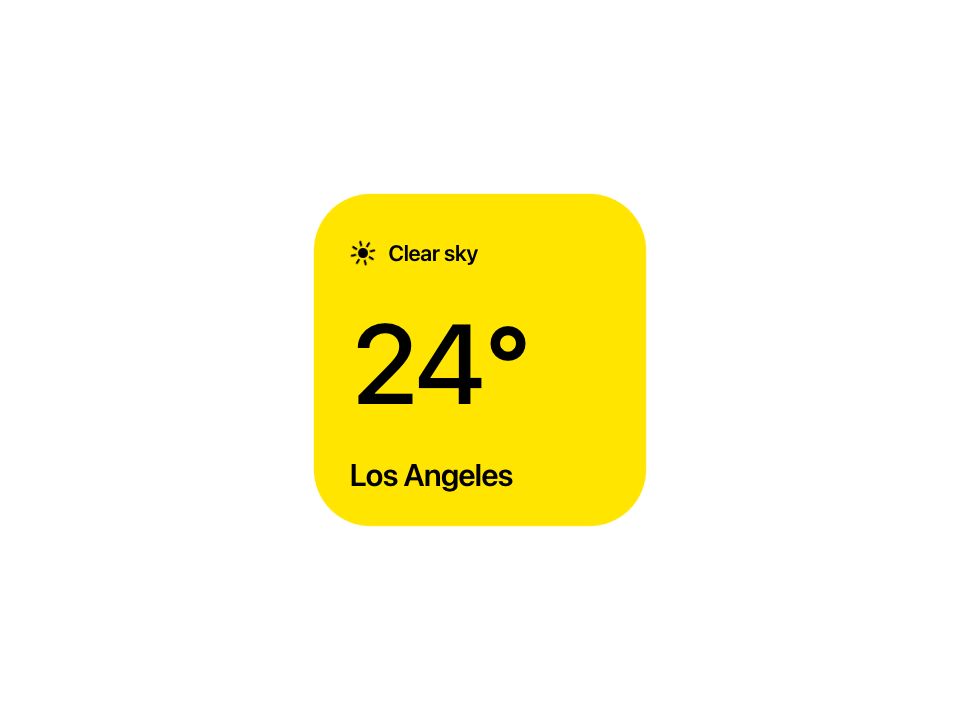
Live component. Click, hover, and type to try it.
Install
npx shadcn@latest add https://pinui.xyz/r/weather.jsonAbout
A weather square that opens out into a five-day forecast.
Live component. Click, hover, and type to try it.
npx shadcn@latest add https://pinui.xyz/r/weather.jsonA weather square that opens out into a five-day forecast.
"use client";

import type React from "react";
import { useEffect, useRef, useState } from "react";
import { animate, useReducedMotion } from "motion/react";
import "./weather.css";

/* ------------------------------------------------------------------ props -- */

export type WeatherCondition = "clear" | "partly" | "rain";

export type WeatherDay = {
  /** Short day name, as it reads in the forecast. */
  day: string;
  condition: WeatherCondition;
  /** What the main panel says once this day is picked. */
  label: string;
  low: number;
  high: number;
};

export type WeatherProps = {
  /** The city on the square, compact card. */
  city?: string;
  /** The city once the card has opened out into the forecast. */
  forecastCity?: string;
  /** Five days works best; the first is the one shown on arrival. */
  days?: WeatherDay[];
  /** Start opened out rather than as the square. */
  defaultExpanded?: boolean;
  /** "light" sits on a pale page; "dark" swaps the shell and forecast to graphite for a dark one. */
  theme?: "light" | "dark";
  /** Fired when a day is picked from the forecast. */
  onSelect?: (day: WeatherDay, index: number) => void;
};

/* ------------------------------------------------------------------- data -- */

const DAYS: WeatherDay[] = [
  { day: "Mon", condition: "clear", label: "Clear sky", low: 8, high: 24 },
  { day: "Tue", condition: "partly", label: "Partly cloudy", low: 11, high: 25 },
  { day: "Wed", condition: "rain", label: "Rain showers", low: 13, high: 22 },
  { day: "Thu", condition: "partly", label: "Partly cloudy", low: 12, high: 23 },
  { day: "Fri", condition: "partly", label: "Partly cloudy", low: 12, high: 23 },
];

/*
 * The main panel takes the colour of the day on show. The hues live in the
 * stylesheet as tokens, so each theme can tune them for its own ground.
 */
const PANEL: Record<WeatherCondition, string> = {
  clear: "var(--pwx-clear)",
  partly: "var(--pwx-partly)",
  rain: "var(--pwx-rain)",
};

/* strong ease-out, for anything entering */
const EASE_OUT = [0.23, 1, 0.32, 1] as const;

/* ------------------------------------------------------------------ icons -- */

/* the forecast's icons are in colour; the panel's are one ink, since they sit on colour */
function Rays({ mono }: { mono?: boolean }) {
  const lines = mono
    ? [
        [16, 1.9, 16, 6.4], [16, 25.6, 16, 30.1], [1.9, 16, 6.4, 16], [25.6, 16, 30.1, 16],
        [6, 6, 9.2, 9.2], [22.8, 22.8, 26, 26], [6, 26, 9.2, 22.8], [22.8, 9.2, 26, 6],
      ]
    : [
        [16, 2.4, 16, 6.2], [16, 25.8, 16, 29.6], [2.4, 16, 6.2, 16], [25.8, 16, 29.6, 16],
        [6.4, 6.4, 9.1, 9.1], [22.9, 22.9, 25.6, 25.6], [6.4, 25.6, 9.1, 22.9], [22.9, 9.1, 25.6, 6.4],
      ];
  return (
    <g className="pwx__rays" stroke={mono ? "currentColor" : "#FFC800"} strokeWidth="2.6" strokeLinecap="round">
      {lines.map(([x1, y1, x2, y2], i) => (
        <line key={i} x1={x1} y1={y1} x2={x2} y2={y2} />
      ))}
    </g>
  );
}

const CLOUD = "a5.3 5.3 0 0 1-.5-10.6 7 7 0 0 1 13.2 1.6 4.6 4.6 0 0 1-.9 9z";

function Icon({ kind, mono }: { kind: WeatherCondition; mono?: boolean }) {
  const sun = mono ? "currentColor" : "#FFC800";
  if (kind === "clear") {
    return (
      <svg viewBox="0 0 32 32" className="pwx__icon" aria-hidden="true">
        <circle cx="16" cy="16" r={mono ? 6.1 : 6.4} fill={sun} />
        <Rays mono={mono} />
      </svg>
    );
  }
  if (kind === "partly") {
    return (
      <svg viewBox="0 0 32 32" className="pwx__icon" aria-hidden="true">
        <g
          transform={mono ? "translate(-2.5 -4) scale(0.8)" : "translate(-2.5 -3.5) scale(0.82)"}
          style={{ transformOrigin: "16px 16px" }}
        >
          <circle cx="16" cy="16" r={mono ? 6.1 : 6.4} fill={sun} />
          <Rays mono={mono} />
        </g>
        <path d={`M12.6 27.4${CLOUD}`} fill={mono ? "currentColor" : "#4DA6FF"} />
      </svg>
    );
  }
  const top = mono ? 22.4 : 22.8;
  const drop = mono ? 25.2 : 25.4;
  return (
    <svg viewBox="0 0 32 32" className="pwx__icon" aria-hidden="true">
      <path d={`M11.6 ${top}${CLOUD}`} fill={mono ? "currentColor" : "#8E8E93"} />
      <g stroke={mono ? "currentColor" : "#4DA6FF"} strokeWidth="2.4" strokeLinecap="round">
        <line x1="12.6" y1={drop} x2="11.6" y2={drop + 3} />
        <line x1="17.4" y1={drop} x2="16.4" y2={drop + 3} />
        <line x1="22.2" y1={drop} x2="21.2" y2={drop + 3} />
      </g>
    </svg>
  );
}

/* --------------------------------------------------------------- odometer -- */

/**
 * The temperature. Each digit is a 0–9 strip in a clipping box; a new reading
 * only translates the strips, so the number rolls to its digits rather than
 * ticking through every value — and a second change mid-roll retargets from
 * wherever the strip has got to.
 */
function Odometer({ value, instant }: { value: number; instant: boolean }) {
  const digits = String(value).split("");
  return (
    <span className="pwx__odometer" data-instant={instant ? "true" : "false"} aria-label={`${value} degrees`}>
      {digits.map((digit, i) => (
        <span className="pwx__digit" key={`${digits.length}-${i}`} aria-hidden="true">
          <span
            className="pwx__strip"
            style={{ "--d": digit, "--n": i } as React.CSSProperties}
          >
            {Array.from({ length: 10 }, (_, d) => (
              <span key={d}>{d}</span>
            ))}
          </span>
        </span>
      ))}
    </span>
  );
}

/* -------------------------------------------------------------- component -- */

/**
 * A weather widget that opens out into a five-day forecast.
 *
 * One card, two states. Compact it is a square panel; opened, the panel shrinks
 * into a black shell and a dark forecast slides out beside it. Every dimension
 * is a custom property, so the two states — and the phone layout, where the
 * forecast stacks underneath — are the same few transitions with different
 * numbers, and a toggle mid-flight retargets instead of restarting.
 */
export default function Weather({
  city = "Los Angeles",
  forecastCity = "Amsterdam",
  days = DAYS,
  defaultExpanded = false,
  theme = "light",
  onSelect,
}: WeatherProps) {
  const reduced = useReducedMotion();
  const rootRef = useRef<HTMLDivElement>(null);
  const [expanded, setExpanded] = useState(defaultExpanded);
  const [picked, setPicked] = useState(0);
  const [pressed, setPressed] = useState(false);
  /* the label on show, which trails the pick so the old one can blur out first */
  const [label, setLabel] = useState(days[0]?.label ?? "");
  const [swapping, setSwapping] = useState(false);
  /* the strips start at 0 and roll up to the first reading once the card lands */
  const [temp, setTemp] = useState(0);
  const [instant, setInstant] = useState(true);

  const day = days[picked] ?? days[0];

  /* the entrance: up and in, then the odometer rolls to its first reading */
  useEffect(() => {
    const el = rootRef.current;
    if (!el) return;
    const first = days[0]?.high ?? 0;
    if (reduced) {
      setTemp(first);
      return;
    }
    const anim = animate(
      el,
      { opacity: [0, 1], transform: ["translateY(10px) scale(0.97)", "translateY(0px) scale(1)"] },
      { duration: 0.3, ease: EASE_OUT },
    );
    /* the inline transform is cleared once it lands, so hover and press own it again */
    anim.finished.then(() => {
      el.style.transform = "";
      el.style.opacity = "";
    });
    /* let the zeroed strips paint, then allow the roll */
    const frame = requestAnimationFrame(() => setInstant(false));
    const roll = setTimeout(() => setTemp(first), 120);
    return () => {
      anim.stop();
      cancelAnimationFrame(frame);
      clearTimeout(roll);
    };
    // eslint-disable-next-line react-hooks/exhaustive-deps
  }, []);

  /* label: out fast, in behind the icon */
  const swapTimer = useRef<ReturnType<typeof setTimeout>>(undefined);
  useEffect(() => () => clearTimeout(swapTimer.current), []);

  function toggle() {
    setExpanded((open) => !open);
  }

  function pick(i: number) {
    if (i === picked) return;
    const next = days[i];
    setPicked(i);
    setTemp(next.high);
    clearTimeout(swapTimer.current);
    if (reduced) {
      setLabel(next.label);
    } else {
      setSwapping(true);
      swapTimer.current = setTimeout(() => {
        setLabel(next.label);
        setSwapping(false);
      }, 130);
    }
    onSelect?.(next, i);
  }

  return (
    <div
      ref={rootRef}
      className="pwx"
      data-theme={theme}
      data-state={expanded ? "expanded" : "compact"}
      data-condition={day.condition}
      data-pressed={pressed ? "true" : "false"}
      onPointerDown={() => setPressed(true)}
      onPointerUp={() => setPressed(false)}
      onPointerCancel={() => setPressed(false)}
      onPointerLeave={() => setPressed(false)}
    >
      {/* ── the main panel: tap it to open or close the forecast ── */}
      <div
        className="pwx__main"
        role="button"
        tabIndex={0}
        aria-expanded={expanded}
        aria-label={expanded ? "Collapse forecast" : "Expand forecast"}
        style={{ backgroundColor: PANEL[day.condition] }}
        onClick={toggle}
        onKeyDown={(event) => {
          if (event.key === "Enter" || event.key === " ") {
            event.preventDefault();
            toggle();
          }
        }}
      >
        <div className="pwx__content">
          <div className="pwx__condition">
            {(["clear", "partly", "rain"] as const).map((kind) => (
              <span className="pwx__condIcon" data-cond-icon={kind} key={kind} aria-hidden="true">
                <Icon kind={kind} mono />
              </span>
            ))}
            <span className="pwx__condText" data-swapping={swapping ? "true" : "false"}>
              {label}
            </span>
          </div>

          <div className="pwx__temp">
            <Odometer value={temp} instant={instant || !!reduced} />
            <span aria-hidden="true">°</span>
          </div>

          <div className="pwx__city">
            <span className="pwx__cityLabel" data-city="compact" aria-hidden={expanded}>
              {city}
            </span>
            <span className="pwx__cityLabel" data-city="expanded" aria-hidden={!expanded}>
              {forecastCity}
            </span>
          </div>
        </div>
      </div>

      {/* ── the dark forecast, parked outside the card until it opens ── */}
      <div className="pwx__forecast" aria-hidden={!expanded}>
        {days.map((d, i) => (
          <button
            type="button"
            className="pwx__row"
            key={`${d.day}-${i}`}
            style={{ "--i": i } as React.CSSProperties}
            aria-pressed={i === picked}
            tabIndex={expanded ? 0 : -1}
            onClick={(event) => {
              event.stopPropagation();
              pick(i);
            }}
          >
            <span className="pwx__day">{d.day}</span>
            <span className="pwx__rowIcon">
              <Icon kind={d.condition} />
            </span>
            <span className="pwx__low">{d.low}</span>
            <span className="pwx__high">{d.high}</span>
          </button>
        ))}
      </div>
    </div>
  );
}