CalendarNew
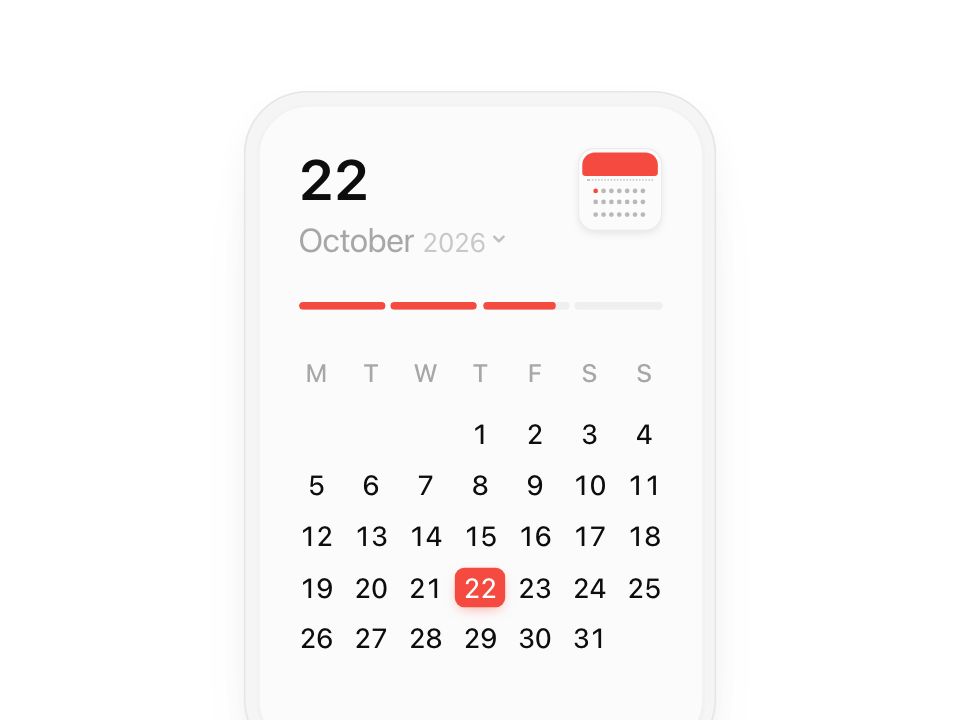
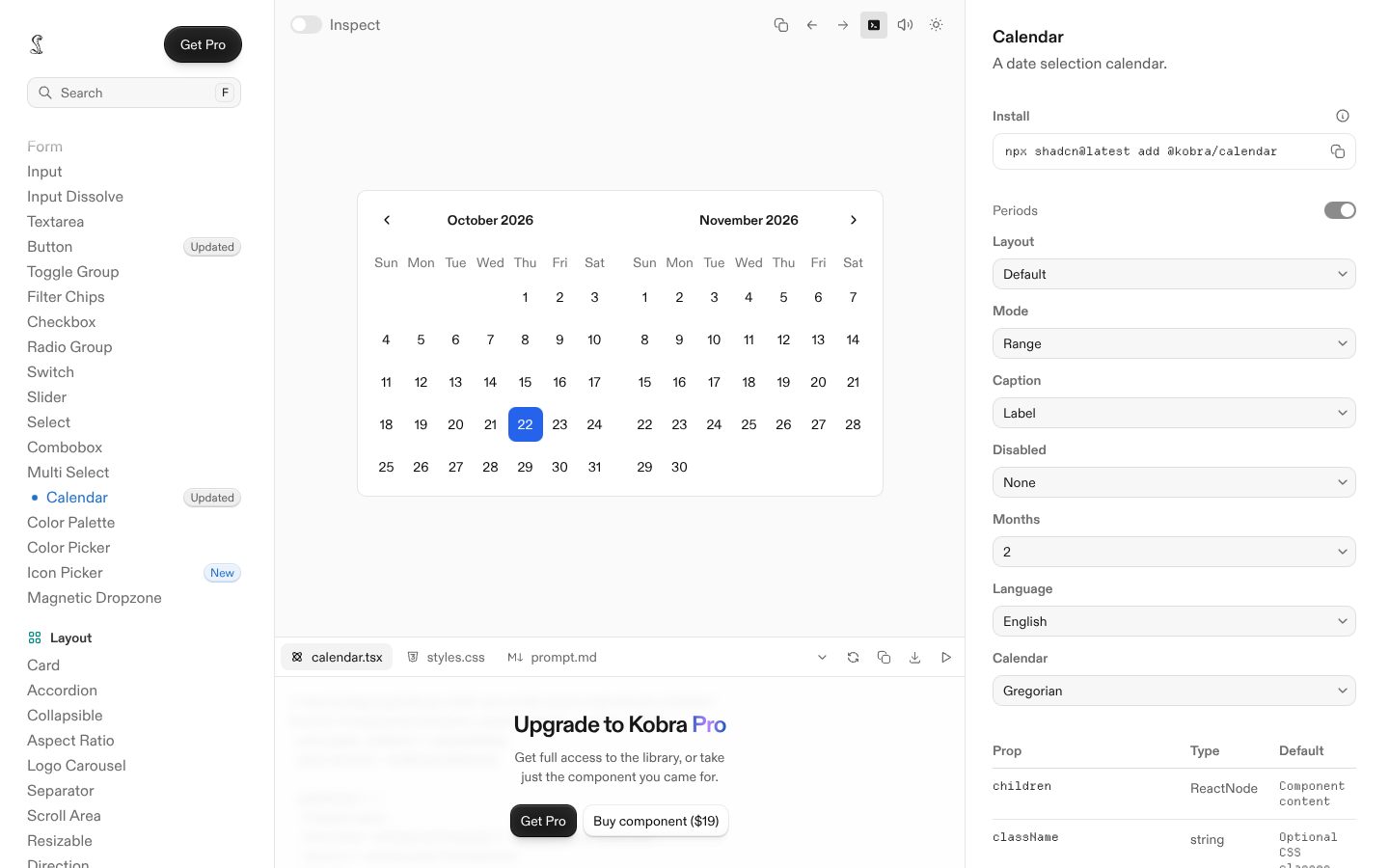
Live component. Click, hover, and type to try it.
Install
npx shadcn@latest add https://pinui.xyz/r/calendar-card.jsonAbout
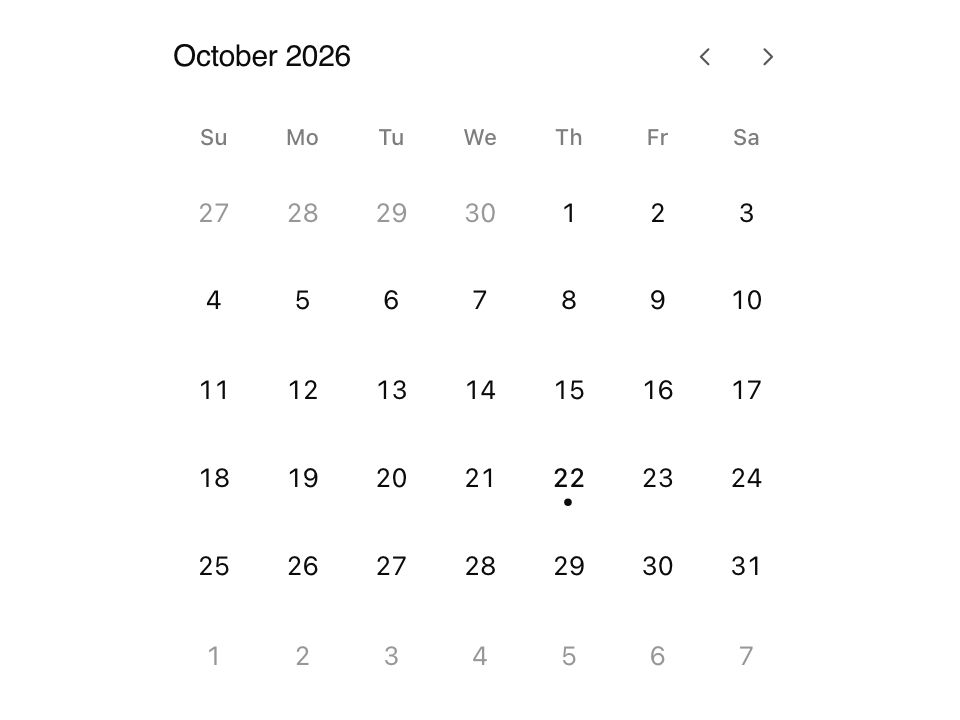
A month card where the selected day glides from date to date.
Live component. Click, hover, and type to try it.
npx shadcn@latest add https://pinui.xyz/r/calendar-card.jsonA month card where the selected day glides from date to date.
"use client";
import {
useCallback,
useEffect,
useId,
useMemo,
useRef,
useState,
useSyncExternalStore,
type KeyboardEvent as ReactKeyboardEvent,
} from "react";
import { AnimatePresence, LayoutGroup, motion, useReducedMotion, type Transition } from "motion/react";
import "./calendar-card.css";
/**
* Calendar — a month card with a date that moves like an object.
*
* The selected day is one red square shared through a layout id, so picking
* another date glides it there on a spring rather than moving a highlight; a
* grey one follows the pointer between days the same way. The big number
* above rolls a digit at a time, the month name swaps through a blur, and the
* bar under them fills to how far through the month the date falls.
*
* The month line under the date is a button too: it opens the picker in place
* of the days — the year with an arrow either side of it, rolling as it
* changes, over the twelve months, where the same red square marks the one
* you are in. Pick a month and the days come back, turned to it. The little
* calendar in the corner tears a page off: the month turns to the next, the
* date keeps its day number (clamped to the new month's length), and
* everything lands together. Arrow keys move a day or a week, Page Up and
* Page Down a month, Home and End to the month's ends; in the picker, Page Up
* and Page Down change the year and Escape closes it.
*
* It opens on today, read from the visitor's own clock so it is their date
* wherever they are, and today stays marked in red as they move around. Left
* open past midnight, it turns to the new day by itself, as long as it was
* still sitting on the old one.
*
* One spring drives every morph, as in Bencho's SelectionList, so all the
* pieces land together.
*/
export type CalendarCardProps = {
/** The date it opens on. Left out, it opens on today, by the visitor's clock. */
defaultDate?: Date;
theme?: "light" | "dark";
/** Fired whenever the selected date changes. */
onChange?: (date: Date) => void;
};
const MONTHS = [
"January",
"February",
"March",
"April",
"May",
"June",
"July",
"August",
"September",
"October",
"November",
"December",
];
const SHORT = ["Jan", "Feb", "Mar", "Apr", "May", "Jun", "Jul", "Aug", "Sep", "Oct", "Nov", "Dec"];
const DAYS = ["M", "T", "W", "T", "F", "S", "S"];
/* the years the picker goes between */
const MIN_YEAR = 1900;
const MAX_YEAR = 2100;
const SEGMENTS = 4;
/* the same motion vocabulary as Bencho's SelectionList: one spring for every morph */
const morph: Transition = { type: "spring", visualDuration: 0.42, bounce: 0.16 };
const fade = (delay = 0): Transition => ({ duration: 0.22, ease: [0.25, 0.1, 0.25, 1], delay });
const daysIn = (y: number, m: number) => new Date(y, m + 1, 0).getDate();
/* Monday-first: how many blank cells come before the 1st */
const leadOf = (y: number, m: number) => (new Date(y, m, 1).getDay() + 6) % 7;
type Ymd = { y: number; m: number; d: number };
function shift({ y, m, d }: Ymd, days: number): Ymd {
const next = new Date(y, m, d + days);
return { y: next.getFullYear(), m: next.getMonth(), d: next.getDate() };
}
function turnMonth({ y, m, d }: Ymd, by: number): Ymd {
const first = new Date(y, m + by, 1);
const ny = first.getFullYear();
const nm = first.getMonth();
return { y: ny, m: nm, d: Math.min(d, daysIn(ny, nm)) };
}
const toYmd = (date: Date): Ymd => ({ y: date.getFullYear(), m: date.getMonth(), d: date.getDate() });
const sameDay = (a: Ymd, b: Ymd) => a.y === b.y && a.m === b.m && a.d === b.d;
/*
* Today, from the visitor's clock, as a "y-m-d" key. It is read on the client
* only: the server has no idea of the visitor's timezone, so its "today" can be
* a day off, and rendering it would not match. Past midnight, or when the tab
* comes back after a while, the key moves on and the card hears about it.
*/
const todayKey = () => {
const now = new Date();
return `${now.getFullYear()}-${now.getMonth()}-${now.getDate()}`;
};
function subscribeToday(onTick: () => void) {
let timer: ReturnType<typeof setTimeout>;
const arm = () => {
const now = new Date();
const midnight = new Date(now.getFullYear(), now.getMonth(), now.getDate() + 1);
/* a beat past midnight, so the new date has certainly begun */
timer = setTimeout(() => {
onTick();
arm();
}, midnight.getTime() - now.getTime() + 500);
};
arm();
const wake = () => {
if (document.visibilityState === "visible") onTick();
};
document.addEventListener("visibilitychange", wake);
window.addEventListener("focus", wake);
return () => {
clearTimeout(timer);
document.removeEventListener("visibilitychange", wake);
window.removeEventListener("focus", wake);
};
}
function useToday(): Ymd | null {
const key = useSyncExternalStore(subscribeToday, todayKey, () => null);
return useMemo(() => {
if (!key) return null;
const [y, m, d] = key.split("-").map(Number);
return { y, m, d };
}, [key]);
}
export default function CalendarCard({ defaultDate, theme = "light", onChange }: CalendarCardProps) {
const today = useToday();
/* a date given up front renders straight away; otherwise the card waits a frame for the visitor's today */
const opening = defaultDate ? toYmd(defaultDate) : today;
if (!opening) {
/* the server's pass, and the client's first: the card's footprint, so nothing moves when it arrives */
return (
<div className="pcal" data-theme={theme} aria-hidden="true">
<div className="pcal__ghost" />
</div>
);
}
return <Calendar opening={opening} today={today} theme={theme} onChange={onChange} />;
}
function Calendar({
opening,
today,
theme,
onChange,
}: {
opening: Ymd;
today: Ymd | null;
theme: "light" | "dark";
onChange?: (date: Date) => void;
}) {
const reduced = useReducedMotion();
const group = useId();
const [date, setDate] = useState<Ymd>(opening);
/* which way the last month change went, so the grid leaves and arrives the right way */
const [dir, setDir] = useState(0);
const [hover, setHover] = useState<number | null>(null);
/* bumps on every tear-off, so the icon's page can flip each time */
const [tears, setTears] = useState(0);
/* the month and year picker, and the year it is showing (browsed before a month is picked) */
const [picking, setPicking] = useState(false);
const [pickYear, setPickYear] = useState(date.y);
const [yearDir, setYearDir] = useState(0);
const [monthHover, setMonthHover] = useState<number | null>(null);
const commit = useCallback(
(next: Ymd) => {
setDate((cur) => {
const monthDelta = (next.y - cur.y) * 12 + (next.m - cur.m);
if (monthDelta !== 0) {
setDir(Math.sign(monthDelta));
setHover(null);
}
return next;
});
onChange?.(new Date(next.y, next.m, next.d));
},
[onChange],
);
/* past midnight, a card still sitting on yesterday moves on to the new day */
const lastToday = useRef(today);
useEffect(() => {
const was = lastToday.current;
lastToday.current = today;
if (was && today && !sameDay(was, today) && sameDay(date, was)) commit(today);
}, [today, date, commit]);
const tearOff = (by: number) => {
setTears((n) => n + 1);
setPicking(false);
commit(turnMonth(date, by));
};
const openPicker = () => {
setPickYear(date.y);
setYearDir(0);
setMonthHover(null);
setPicking((on) => !on);
};
const stepYear = (by: number) => {
setYearDir(by);
setPickYear((y) => Math.min(MAX_YEAR, Math.max(MIN_YEAR, y + by)));
};
const pickMonth = (m: number) => {
commit({ y: pickYear, m, d: Math.min(date.d, daysIn(pickYear, m)) });
setPicking(false);
};
const onPickerKey = (e: ReactKeyboardEvent<HTMLDivElement>) => {
if (e.key === "Escape") {
e.preventDefault();
setPicking(false);
} else if (e.key === "PageUp" || e.key === "PageDown") {
e.preventDefault();
stepYear(e.key === "PageUp" ? -1 : 1);
}
};
const total = daysIn(date.y, date.m);
const lead = leadOf(date.y, date.m);
const cells = useMemo(
() => Array.from({ length: lead + total }, (_, i) => (i < lead ? null : i - lead + 1)),
[lead, total],
);
const fill = date.d / total;
const onKeyDown = (e: ReactKeyboardEvent<HTMLDivElement>) => {
const moves: Record<string, () => Ymd> = {
ArrowLeft: () => shift(date, -1),
ArrowRight: () => shift(date, 1),
ArrowUp: () => shift(date, -7),
ArrowDown: () => shift(date, 7),
PageUp: () => turnMonth(date, -1),
PageDown: () => turnMonth(date, 1),
Home: () => ({ ...date, d: 1 }),
End: () => ({ ...date, d: total }),
};
const move = moves[e.key];
if (!move) return;
e.preventDefault();
if (e.key === "PageUp" || e.key === "PageDown") setTears((n) => n + 1);
commit(move());
};
const monthKey = `${date.y}-${date.m}`;
const dayText = String(date.d);
const label = `${MONTHS[date.m]} ${date.d}, ${date.y}`;
return (
<div className="pcal" data-theme={theme}>
<LayoutGroup id={`pcal-${group}`}>
<motion.div
className="pcal__shell"
initial={reduced ? false : { opacity: 0, y: 14, scale: 0.97 }}
animate={{ opacity: 1, y: 0, scale: 1 }}
transition={{ ...morph, opacity: fade() }}
>
<div className="pcal__card">
<header className="pcal__head">
<div className="pcal__title" aria-live="polite" aria-label={label}>
{/* the day: an odometer, each digit that changes rolls through */}
<span className="pcal__day" aria-hidden="true">
<Odometer value={dayText} />
</span>
{/*
The month and year: a button that opens the picker. The month swaps
through a blur, leaving the way the page turned; the year rolls.
*/}
<button
type="button"
className="pcal__monthBtn"
aria-expanded={picking}
aria-label={picking ? "Close the month and year picker" : `Change month or year — ${MONTHS[date.m]} ${date.y}`}
onClick={openPicker}
>
<span className="pcal__month" aria-hidden="true">
<AnimatePresence initial={false} mode="popLayout" custom={dir}>
<motion.span
key={monthKey}
className="pcal__monthName"
custom={dir}
variants={{
enter: (d: number) => ({ opacity: 0, x: d * 14, filter: "blur(4px)" }),
center: { opacity: 1, x: 0, filter: "blur(0px)" },
exit: (d: number) => ({ opacity: 0, x: d * -14, filter: "blur(4px)" }),
}}
initial="enter"
animate="center"
exit="exit"
transition={{ ...morph, opacity: fade(), filter: fade() }}
>
{MONTHS[date.m]}
</motion.span>
</AnimatePresence>
</span>
<span className="pcal__year" aria-hidden="true">
<Odometer value={String(date.y)} />
</span>
<motion.svg
className="pcal__chevron"
viewBox="0 0 12 12"
fill="none"
aria-hidden="true"
animate={{ rotate: picking ? 180 : 0 }}
transition={morph}
>
<path d="m3 4.5 3 3 3-3" stroke="currentColor" strokeWidth="1.6" strokeLinecap="round" strokeLinejoin="round" />
</motion.svg>
</button>
</div>
<CalendarIcon tears={tears} day={date.d} onTear={() => tearOff(1)} onBack={() => tearOff(-1)} />
</header>
{/* how far through the month the date falls, across four segments */}
<div className="pcal__progress" aria-hidden="true">
{Array.from({ length: SEGMENTS }, (_, i) => {
const part = Math.max(0, Math.min(1, fill * SEGMENTS - i));
return (
<span key={i} className="pcal__seg">
<motion.span
className="pcal__segFill"
initial={reduced ? false : { scaleX: 0 }}
animate={{ scaleX: part }}
transition={{ ...morph, delay: reduced ? 0 : 0.05 + i * 0.04 }}
/>
</span>
);
})}
</div>
{/* the days, or in their place the month and year picker, in one fixed-height body */}
<div className="pcal__body">
<AnimatePresence initial={false} mode="popLayout">
{picking ? (
<motion.div
key="picker"
className="pcal__picker"
initial={{ opacity: 0, scale: 0.96, filter: "blur(6px)" }}
animate={{ opacity: 1, scale: 1, filter: "blur(0px)" }}
exit={{ opacity: 0, scale: 0.96, filter: "blur(6px)" }}
transition={{ ...morph, opacity: fade(), filter: fade() }}
onKeyDown={onPickerKey}
>
<div className="pcal__yearRow">
<motion.button
type="button"
className="pcal__step"
aria-label="Previous year"
disabled={pickYear <= MIN_YEAR}
onClick={() => stepYear(-1)}
whileTap={reduced ? undefined : { scale: 0.86, x: -2 }}
transition={morph}
>
<svg viewBox="0 0 12 12" fill="none" aria-hidden="true">
<path d="M7.5 3 4.5 6l3 3" stroke="currentColor" strokeWidth="1.7" strokeLinecap="round" strokeLinejoin="round" />
</svg>
</motion.button>
<span className="pcal__yearBig" aria-live="polite" aria-label={`Year ${pickYear}`}>
<Odometer value={String(pickYear)} dir={yearDir} />
</span>
<motion.button
type="button"
className="pcal__step"
aria-label="Next year"
disabled={pickYear >= MAX_YEAR}
onClick={() => stepYear(1)}
whileTap={reduced ? undefined : { scale: 0.86, x: 2 }}
transition={morph}
>
<svg viewBox="0 0 12 12" fill="none" aria-hidden="true">
<path d="m4.5 3 3 3-3 3" stroke="currentColor" strokeWidth="1.7" strokeLinecap="round" strokeLinejoin="round" />
</svg>
</motion.button>
</div>
<div
className="pcal__months"
role="grid"
aria-label={`Months of ${pickYear}`}
onPointerLeave={() => setMonthHover(null)}
>
{SHORT.map((name, m) => {
const on = pickYear === date.y && m === date.m;
const now = today !== null && pickYear === today.y && m === today.m;
return (
<motion.button
key={name}
type="button"
role="gridcell"
aria-selected={on}
aria-label={`${MONTHS[m]} ${pickYear}`}
className="pcal__monthCell"
data-selected={on || undefined}
data-today={now || undefined}
onPointerEnter={(e) => e.pointerType === "mouse" && setMonthHover(m)}
onClick={() => pickMonth(m)}
whileTap={reduced ? undefined : { scale: 0.92 }}
initial={reduced ? false : { opacity: 0, y: 6 }}
animate={{ opacity: 1, y: 0 }}
transition={{
...morph,
opacity: { ...fade(), delay: reduced ? 0 : 0.04 + Math.floor(m / 3) * 0.035 },
y: { ...morph, delay: reduced ? 0 : 0.04 + Math.floor(m / 3) * 0.035 },
}}
>
{monthHover === m && !on && (
<motion.span layoutId="pcal-mhover" className="pcal__mHover" transition={morph} />
)}
{on && <motion.span layoutId="pcal-mselected" className="pcal__mSelected" transition={morph} />}
<span className="pcal__num">{name}</span>
</motion.button>
);
})}
</div>
</motion.div>
) : (
<motion.div
key="days"
className="pcal__days"
initial={{ opacity: 0, scale: 0.97, filter: "blur(6px)" }}
animate={{ opacity: 1, scale: 1, filter: "blur(0px)" }}
exit={{ opacity: 0, scale: 0.97, filter: "blur(6px)" }}
transition={{ ...morph, opacity: fade(), filter: fade() }}
>
<div className="pcal__week" aria-hidden="true">
{DAYS.map((d, i) => (
<span key={i}>{d}</span>
))}
</div>
<div
className="pcal__gridWrap"
role="grid"
aria-label={`${MONTHS[date.m]} ${date.y}`}
tabIndex={0}
onKeyDown={onKeyDown}
onPointerLeave={() => setHover(null)}
>
<AnimatePresence initial={false} mode="popLayout" custom={dir}>
<motion.div
key={monthKey}
className="pcal__grid"
role="rowgroup"
custom={dir}
variants={{
enter: (d: number) => ({ opacity: 0, x: d * 28, filter: "blur(6px)" }),
center: { opacity: 1, x: 0, filter: "blur(0px)" },
exit: (d: number) => ({ opacity: 0, x: d * -28, filter: "blur(6px)" }),
}}
initial={reduced ? false : "enter"}
animate="center"
exit="exit"
transition={{ ...morph, opacity: fade(), filter: fade() }}
>
{cells.map((day, i) => {
const isToday = today !== null && today.y === date.y && today.m === date.m && today.d === day;
return day === null ? (
<span key={`b${i}`} className="pcal__cell" aria-hidden="true" />
) : (
<motion.button
key={day}
type="button"
role="gridcell"
tabIndex={-1}
aria-selected={day === date.d}
aria-label={`${MONTHS[date.m]} ${day}${isToday ? ", today" : ""}`}
aria-current={isToday ? "date" : undefined}
className="pcal__cell pcal__date"
data-selected={day === date.d || undefined}
data-today={isToday || undefined}
onPointerEnter={(e) => e.pointerType === "mouse" && setHover(day)}
onClick={() => commit({ ...date, d: day })}
whileTap={reduced ? undefined : { scale: 0.9 }}
/* the first paint: the days arrive a row at a time */
initial={reduced || dir !== 0 ? false : { opacity: 0, y: 6 }}
animate={{ opacity: 1, y: 0 }}
/* the row delay is on the entrance only, never on the press */
transition={{
...morph,
opacity: { ...fade(), delay: dir !== 0 || reduced ? 0 : 0.14 + Math.floor(i / 7) * 0.045 },
y: { ...morph, delay: dir !== 0 || reduced ? 0 : 0.14 + Math.floor(i / 7) * 0.045 },
}}
>
{hover === day && day !== date.d && (
<motion.span layoutId="pcal-hover" className="pcal__hover" transition={morph} />
)}
{day === date.d && (
<motion.span layoutId="pcal-selected" className="pcal__selected" transition={morph} />
)}
<span className="pcal__num">{day}</span>
</motion.button>
);
})}
</motion.div>
</AnimatePresence>
</div>
</motion.div>
)}
</AnimatePresence>
</div>
</div>
</motion.div>
</LayoutGroup>
</div>
);
}
/* a number that rolls: each character that changes slides through, the others stay put */
function Odometer({ value, dir = 1 }: { value: string; dir?: number }) {
const up = dir >= 0;
return (
<AnimatePresence initial={false} mode="popLayout">
{value.split("").map((c, i) => (
<motion.span
key={`${value.length - i}:${c}`}
className="pcal__digit"
layout="position"
initial={{ y: up ? "70%" : "-70%", opacity: 0, filter: "blur(3px)" }}
animate={{ y: 0, opacity: 1, filter: "blur(0px)" }}
exit={{ y: up ? "-70%" : "70%", opacity: 0, filter: "blur(3px)" }}
transition={{ ...morph, opacity: fade(), filter: fade() }}
>
{c}
</motion.span>
))}
</AnimatePresence>
);
}
/*
* The little calendar: a red header over a field of dots, one of them red.
* Pressed, its page tears off — a leaf of red flips up and away while the
* dots run a quick ripple — and the card turns to the next month. A right
* click (or a long press's context menu) turns back instead.
*/
function CalendarIcon({
tears,
day,
onTear,
onBack,
}: {
tears: number;
day: number;
onTear: () => void;
onBack: () => void;
}) {
const reduced = useReducedMotion();
/* the red dot sits where the selected day would in a 7 × 3 sketch of the month */
const marked = (day - 1) % 21;
return (
<motion.button
type="button"
className="pcal__icon"
aria-label="Next month"
title="Next month (right-click for the previous one)"
onClick={onTear}
onContextMenu={(e) => {
e.preventDefault();
onBack();
}}
whileHover={reduced ? undefined : { y: -1.5, rotate: -2 }}
whileTap={reduced ? undefined : { scale: 0.92 }}
transition={morph}
>
<span className="pcal__iconTop" />
{/* the page that tears off, once per turn */}
<AnimatePresence>
{tears > 0 && !reduced && (
<motion.span
key={tears}
className="pcal__leaf"
initial={{ rotateX: 0, opacity: 1, y: 0 }}
animate={{ rotateX: 75, opacity: 0, y: -10 }}
transition={{ duration: 0.45, ease: [0.4, 0, 0.2, 1] }}
/>
)}
</AnimatePresence>
<span className="pcal__dots">
{Array.from({ length: 21 }, (_, i) => (
<motion.span
key={`${i}-${tears}`}
className="pcal__dot"
data-on={i === marked || undefined}
initial={tears > 0 && !reduced ? { scale: 0.3, opacity: 0 } : false}
animate={{ scale: 1, opacity: 1 }}
transition={{ ...morph, delay: tears > 0 ? 0.12 + (i % 7) * 0.018 + Math.floor(i / 7) * 0.03 : 0 }}
/>
))}
</span>
</motion.button>
);
}