Date Range PickerNew
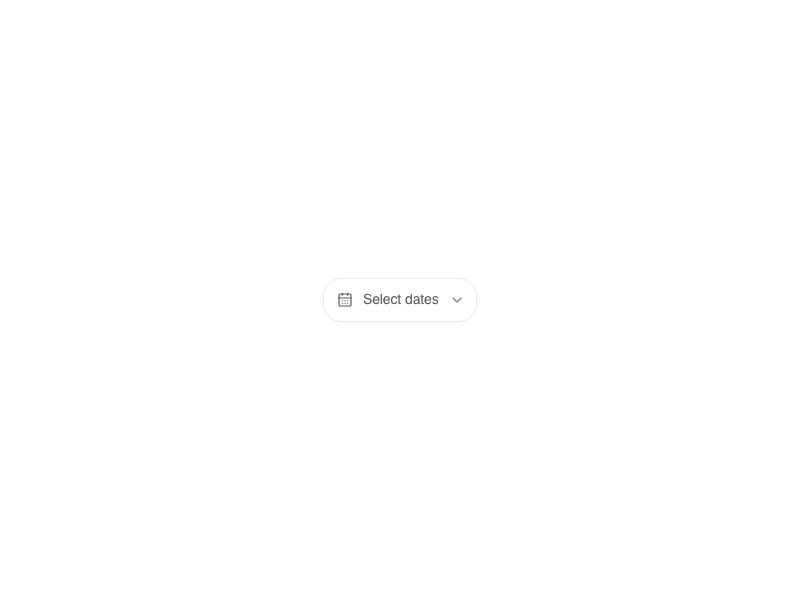
Live component. Click, hover, and type to try it.
Install
npx shadcn@latest add https://boardui.com/r/date-range-picker.jsonAbout
Two-month range picker sharing the date-picker chrome.
Live component. Click, hover, and type to try it.
npx shadcn@latest add https://boardui.com/r/date-range-picker.jsonTwo-month range picker sharing the date-picker chrome.
"use client";

import { useMemo, useRef, useState } from "react";
import {
  Button as AriaButton,
  Dialog,
  DialogTrigger,
  Popover,
  RangeCalendar,
  useLocale,
} from "react-aria-components";
import {
  CalendarDate,
  endOfMonth,
  endOfYear,
  getLocalTimeZone,
  isSameDay,
  startOfMonth,
  startOfYear,
  today,
} from "@internationalized/date";
import { RiCalendarLine } from "@remixicon/react";
import { AnimatePresence, motion } from "motion/react";
import { Button } from "@/components/base/buttons/button";
import { useTemplateCopy } from "@/components/foundations/template-copy/template-copy";
import {
  DateChipInput,
  MonthPanel,
  formatTriggerDate,
  popoverClassName,
  triggerButtonClassName,
} from "@/components/base/date-picker/shared";
import { cx } from "@/utils/cx";
import { useDismissOnOutsidePress, useTriggerToggle } from "@/utils/use-dismiss-on-outside-press";

/**
 * Figma source: Board UI → "Calendar" (node 3871:5738).
 *
 * A dual-month date range picker: trigger button opens a popover with a
 * quick-select sidebar, two adjacent months (react-aria's
 * `visibleDuration={{ months: 2 }}`), and a footer with read-only date chips,
 * a "N days selected" pill, and Cancel/Apply.
 *
 * Two deliberate departures from the raw Figma frame:
 *  - The prev/next chevrons in Figma appear on *both* sides of *both* month
 *    headers (4 total), pre-rotated generic vector exports. A dual-month
 *    calendar only has one navigation state (the two months always stay
 *    adjacent), so only the outer two chevrons (prev on month 1, next on
 *    month 2) are wired up; the inner two slots are kept as invisible
 *    spacers rather than dead click targets, preserving Figma's header
 *    spacing without fake buttons.
 *  - The connecting range background (Figma: one hardcoded `bg-blue-100`
 *    rectangle sized for the one example range shown) is generalized into a
 *    per-cell layered background driven by react-aria's `isSelectionStart` /
 *    `isSelectionEnd` state, so any range length/position renders correctly.
 *
 * Colors/radii/spacing (semantic range-selection blues, blue-500/600,
 * radius/2lg/xl/2xl/3xl,
 * shadow-xs, background/secondary/default, background/tertiary/default,
 * border/button/default) are Tailwind v4 defaults or existing semantic
 * tokens — see styles/theme.css.
 *
 * Shared chrome (chevrons, day cell, month panel, editable date chip, trigger
 * + popover surfaces) lives in `./shared` — `DatePicker` (single-month,
 * non-range) reuses the same pieces.
 */

export interface DateRangeValue {
  start: CalendarDate;
  end: CalendarDate;
}

export interface DateRangePickerProps {
  value?: DateRangeValue | null;
  defaultValue?: DateRangeValue | null;
  onChange?: (value: DateRangeValue | null) => void;
  isDisabled?: boolean;
  className?: string;
  /** Extra classes for the portalled calendar, such as a locale-specific font. */
  popoverClassName?: string;
  "aria-label"?: string;
  /** Trigger text shown when no range is committed yet. Default "Select date range". */
  placeholder?: string;
}

function daysInRange(value: DateRangeValue) {
  const tz = getLocalTimeZone();
  const ms = value.end.toDate(tz).getTime() - value.start.toDate(tz).getTime();
  return Math.round(ms / 86_400_000) + 1;
}

function useQuickSelectPresets() {
  return useMemo(() => {
    const now = today(getLocalTimeZone());
    const lastMonth = now.subtract({ months: 1 });
    const lastYear = now.subtract({ years: 1 });
    return [
      { label: "Today", range: { start: now, end: now } },
      { label: "Yesterday", range: { start: now.subtract({ days: 1 }), end: now.subtract({ days: 1 }) } },
      { label: "Last week", range: { start: now.subtract({ days: 7 }), end: now.subtract({ days: 1 }) } },
      { label: "This month", range: { start: startOfMonth(now), end: endOfMonth(now) } },
      { label: "Last month", range: { start: startOfMonth(lastMonth), end: endOfMonth(lastMonth) } },
      { label: "This year", range: { start: startOfYear(now), end: endOfYear(now) } },
      { label: "Last year", range: { start: startOfYear(lastYear), end: endOfYear(lastYear) } },
      { label: "All time", range: { start: now.subtract({ years: 10 }), end: now } },
    ];
  }, []);
}

function isPresetActive(value: DateRangeValue | null, range: DateRangeValue) {
  return !!value && isSameDay(value.start, range.start) && isSameDay(value.end, range.end);
}

function QuickSelect({
  value,
  onSelect,
}: {
  value: DateRangeValue | null;
  onSelect: (range: DateRangeValue) => void;
}) {
  const localize = useTemplateCopy();
  const presets = useQuickSelectPresets();

  return localize((
    <div className="flex w-[118px] shrink-0 flex-col gap-1.5">
      {presets.map((preset) => (
        <button
          key={preset.label}
          type="button"
          onClick={() => onSelect(preset.range)}
          className={cx(
            "w-full cursor-pointer rounded-2lg px-2 py-1.5 text-start text-body-medium text-text-primary transition-colors duration-150 ease",
            isPresetActive(value, preset.range)
              ? "bg-background-tertiary-default"
              : "hover:bg-background-secondary-hover",
          )}
        >
          {preset.label}
        </button>
      ))}
    </div>
  ));
}

function Footer({
  value,
  onChange,
  onCancel,
  onApply,
}: {
  value: DateRangeValue | null;
  onChange: (value: DateRangeValue) => void;
  onCancel: () => void;
  onApply: () => void;
}) {
  const localize = useTemplateCopy();
  return localize((
    <div className="flex items-center justify-between pt-3 pe-4">
      <div className="flex items-center gap-2.5">
        <AnimatePresence>
          {value && (
            <motion.div
              key="range-summary"
              initial={{ opacity: 0, y: -12 }}
              animate={{ opacity: 1, y: 0 }}
              exit={{ opacity: 0, y: -12 }}
              transition={{ duration: 0.25, ease: [0.34, 1.2, 0.64, 1] }}
              className="flex items-center gap-2.5"
            >
              <div className="flex items-center gap-[5px]">
                <DateChipInput
                  date={value.start}
                  label="Start date"
                  onCommit={(start) =>
                    onChange({ start, end: start.compare(value.end) > 0 ? start : value.end })
                  }
                />
                <span className="text-body-medium text-text-secondary">-</span>
                <DateChipInput
                  date={value.end}
                  label="End date"
                  onCommit={(end) =>
                    onChange({ start: end.compare(value.start) < 0 ? end : value.start, end })
                  }
                />
              </div>
              <span className="rounded-xl bg-background-tertiary-default px-2 py-2 text-body-medium text-text-secondary">
                {`${daysInRange(value)} day${daysInRange(value) === 1 ? "" : "s"} selected`}
              </span>
            </motion.div>
          )}
        </AnimatePresence>
      </div>
      <div className="flex items-center gap-2.5">
        <Button variant="secondary" onClick={onCancel}>
          Cancel
        </Button>
        <Button onClick={onApply} disabled={!value}>
          Apply
        </Button>
      </div>
    </div>
  ));
}

export function DateRangePicker({
  value,
  defaultValue = null,
  onChange,
  isDisabled,
  className,
  popoverClassName: calendarClassName,
  "aria-label": ariaLabel = "Date range",
  placeholder = "Select date range",
}: DateRangePickerProps) {
  const localize = useTemplateCopy();
  const { locale } = useLocale();
  const isControlled = value !== undefined;
  const [internalValue, setInternalValue] = useState<DateRangeValue | null>(defaultValue);
  const committedValue = isControlled ? (value ?? null) : internalValue;

  const [pendingValue, setPendingValue] = useState<DateRangeValue | null>(committedValue);

  const commit = (next: DateRangeValue | null) => {
    if (!isControlled) setInternalValue(next);
    onChange?.(next);
  };

  const [isOpen, setIsOpen] = useState(false);
  const triggerRef = useRef<HTMLButtonElement>(null);
  const popoverRef = useRef<HTMLElement>(null);
  useDismissOnOutsidePress(isOpen, () => setIsOpen(false), [triggerRef, popoverRef]);
  // Pressing the trigger while open closes the popover instead of reopening
  const allowOpenChange = useTriggerToggle(isOpen, triggerRef);

  return localize((
    <DialogTrigger
      isOpen={isOpen}
      onOpenChange={(open) => {
        if (!allowOpenChange(open)) return;
        if (open) setPendingValue(committedValue);
        setIsOpen(open);
      }}
    >
      <AriaButton ref={triggerRef} isDisabled={isDisabled} className={cx(triggerButtonClassName, className)}>
        <RiCalendarLine className="size-5 shrink-0 text-foreground-icon-primary" aria-hidden />
        <span className="flex items-center justify-center whitespace-nowrap px-1 text-body-medium text-text-primary">
          {committedValue ? `${formatTriggerDate(committedValue.start, locale)} - ${formatTriggerDate(committedValue.end, locale)}` : placeholder}
        </span>
      </AriaButton>
      <Popover ref={popoverRef} offset={4} placement="bottom end" isNonModal className={cx(popoverClassName, calendarClassName)}>
        <Dialog aria-label={ariaLabel} className="outline-none">
          {({ close }) => (
            <RangeCalendar
              aria-label={ariaLabel}
              visibleDuration={{ months: 2 }}
              value={pendingValue}
              onChange={setPendingValue}
            >
              <div className="flex gap-3">
                <div className="pt-4 ps-4">
                  <QuickSelect
                    value={pendingValue}
                    onSelect={(range) => setPendingValue(range)}
                  />
                </div>
                <div className="flex flex-col pt-2 pe-2 pb-3">
                  <div className="flex gap-2">
                    <MonthPanel offset={0} showPrev />
                    <MonthPanel offset={1} showNext />
                  </div>
                  <Footer
                    value={pendingValue}
                    onChange={setPendingValue}
                    onCancel={() => {
                      setPendingValue(committedValue);
                      close();
                    }}
                    onApply={() => {
                      commit(pendingValue);
                      close();
                    }}
                  />
                </div>
              </div>
            </RangeCalendar>
          )}
        </Dialog>
      </Popover>
    </DialogTrigger>
  ));
}