"use client";

import type { FormEvent, ReactNode } from "react";
import { useState } from "react";
import { RiMailCheckLine } from "@remixicon/react";
import { Button } from "@/components/base/buttons/button";
import { Checkbox } from "@/components/base/checkbox/checkbox";
import { Divider } from "@/components/base/divider/divider";
import { Input } from "@/components/base/input/input";
import { InputOtp } from "@/components/base/input-otp/input-otp";
import { LinkButton } from "@/components/base/buttons/link-button";
import { SocialButton } from "@/components/base/social-button/social-button";
import { SOCIAL_PROVIDERS, type SocialProvider } from "@/components/base/social-button/social-providers";
import { useTemplateCopy } from "@/components/foundations/template-copy/template-copy";
import { cx } from "@/utils/cx";

// Re-exported so `media` has a batteries-included option and the registry
// installs it alongside the card. Nothing here imports it otherwise.
export {
  AuthMediaCarousel,
  type AuthMediaSlide,
} from "@/components/application/auth/auth-media-carousel";

/**
 * Sign-in and sign-up cards built on the social buttons.
 *
 * The providers render one of three ways, because each is right somewhere:
 *
 *   layout="stacked"  full-width buttons with labels, one per row. Names each
 *                     provider, so it suits a dedicated sign-in page with the
 *                     room to spell them out.
 *   layout="inline"   icon-only squares side by side. Compact enough for a
 *                     modal or a narrow panel, and carries more providers in
 *                     the same space.
 *   layout="grid"     icon-only across equal columns, so a small set reads as
 *                     one row of controls rather than loose squares.
 *
 * All three sit below the email form, never above it, and all three take the
 * same `providers` array, so switching is one prop and the set never has to
 * be written twice.
 *
 * `media` turns the whole thing into a two-column split with artwork beside
 * the form — pass `AuthMediaCarousel` for a set of images that cycles on its
 * own — and `logo` puts a mark above the title.
 *
 * `mode="verify"` is the step after either one: OTP boxes instead of email
 * and password, a resend action instead of a link to the other mode, and no
 * providers at all, since the visitor has already chosen how they sign in.
 *
 * The form is deliberately uncontrolled and `onSubmit`-based: an auth card is
 * the shell around whatever the host app's auth library does, not an opinion
 * about it. Pass `onSubmit` and `onProvider`, or swap the CTA for your own.
 */

export type AuthLayout = "stacked" | "inline" | "grid";
export type AuthMode = "signin" | "signup" | "verify";

export interface AuthCardProps {
  /**
   * `signin` (default), `signup`, or `verify` for the one-time-code step.
   * `verify` swaps the email fields for OTP boxes and drops the providers:
   * the visitor has already chosen how they are signing in.
   */
  mode?: AuthMode;
  /** `verify` only: the address the code went to, shown in the description. */
  email?: string;
  /** `verify` only: how many digits. Defaults to 6. */
  codeLength?: number;
  /** `verify` only: fires once the last box is filled. */
  onComplete?: (code: string) => void;
  /** `verify` only: the resend action. */
  onResend?: () => void;
  /** How the provider buttons are arranged. Defaults to `stacked`. */
  layout?: AuthLayout;
  providers?: SocialProvider[];
  title?: ReactNode;
  description?: ReactNode;
  /**
   * Artwork for the right half. Passing it turns the card into the split
   * layout: form on the left, media on the right, which drops to the form
   * alone below `md` rather than stacking a tall image above the fields.
   */
  media?: ReactNode;
  /**
   * Mark above the title — a wordmark, an app icon, anything. Deliberately a
   * node rather than a src, so the card stays brand-agnostic and an installed
   * copy pulls none of BoardUI's own artwork with it.
   */
  logo?: ReactNode;
  /** Centre the heading, as the split layout usually wants. */
  centered?: boolean;
  /** Sign-up only: adds a stacked confirm-password field. */
  confirmPassword?: boolean;
  /** Small print under the card, outside its border. */
  footnote?: ReactNode;
  /** Fires with the form's own FormData; wire it to your auth library. */
  onSubmit?: (data: FormData) => void;
  onProvider?: (provider: SocialProvider) => void;
  /** Footer link target, e.g. to the opposite mode. */
  switchHref?: string;
  /**
   * Heading level for the card title. Defaults to `1`, because on a real
   * sign-in screen the card *is* the page. Drop it to `2`+ wherever the card
   * is embedded as a preview inside a page that already has an `<h1>` — two
   * `<h1>`s in one document flattens the outline for screen readers and for
   * anything reading the page as a document.
   */
  headingLevel?: 1 | 2 | 3 | 4 | 5 | 6;
  className?: string;
}

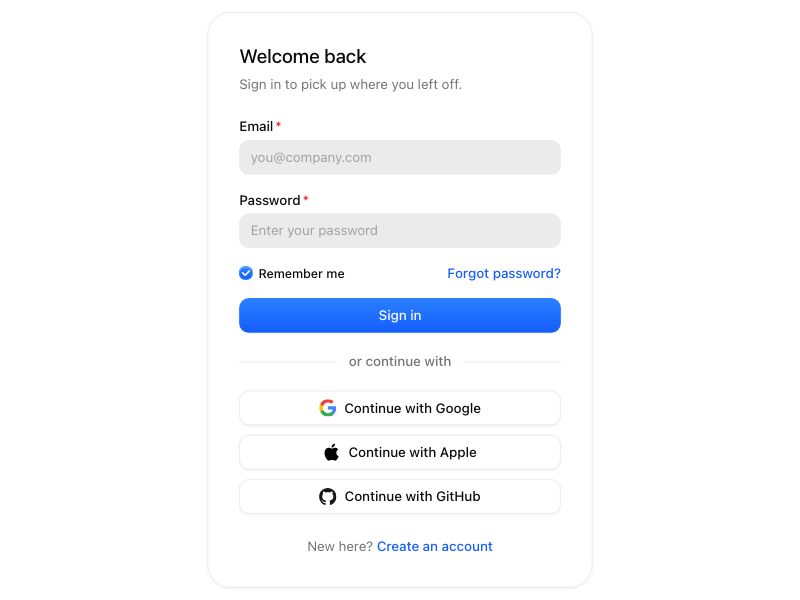
const COPY = {
  signin: {
    title: "Welcome back",
    description: "Sign in to pick up where you left off.",
    cta: "Sign in",
    switchLead: "New here?",
    switchAction: "Create an account",
  },
  signup: {
    title: "Create your account",
    description: "Start building with BoardUI in a couple of minutes.",
    cta: "Create account",
    switchLead: "Already have an account?",
    switchAction: "Sign in",
  },
  verify: {
    title: "Check your inbox",
    description: "Enter the code we sent to finish signing in.",
    cta: "Verify and continue",
    switchLead: "Code not arriving?",
    switchAction: "Send a new one",
  },
} as const;

export function AuthCard({
  mode = "signin",
  email,
  codeLength = 6,
  onComplete,
  onResend,
  layout = "stacked",
  providers = ["google", "apple", "github"],
  title,
  description,
  media,
  logo,
  centered = false,
  confirmPassword = false,
  footnote,
  onSubmit,
  onProvider,
  switchHref = "#",
  headingLevel = 1,
  className,
}: AuthCardProps) {
  const localize = useTemplateCopy();
  const TitleHeading = `h${headingLevel}` as const;
  const [remember, setRemember] = useState(true);
  const [code, setCode] = useState("");
  const copy = COPY[mode];
  const signup = mode === "signup";
  const verify = mode === "verify";

  const submit = (event: FormEvent<HTMLFormElement>) => {
    event.preventDefault();
    onSubmit?.(new FormData(event.currentTarget));
  };

  const social = (
    <div
      className={cx(
        layout === "stacked" && "flex flex-col gap-2.5",
        // Wraps rather than scrolls: six providers on a narrow card should
        // fall to a second row, not clip.
        layout === "inline" && "flex flex-wrap justify-center gap-2",
        // Equal columns that share the full width, so three providers read as
        // one row of controls rather than three loose squares.
        layout === "grid" && "grid grid-flow-col auto-cols-fr gap-2.5",
      )}
    >
      {providers.map((provider) => (
        <SocialButton
          key={provider}
          brand={provider}
          appearance="white"
          iconOnly={layout !== "stacked"}
          fullWidth={layout === "stacked"}
          // `iconOnly` fixes a square width; the grid needs it to stretch,
          // and `className` is last into `cx` so it wins.
          className={layout === "grid" ? "w-full" : undefined}
          aria-label={layout !== "stacked" ? `Continue with ${SOCIAL_PROVIDERS[provider].label}` : undefined}
          onClick={() => onProvider?.(provider)}
        >
          {`Continue with ${SOCIAL_PROVIDERS[provider].label}`}
        </SocialButton>
      ))}
    </div>
  );

  // The code step centres itself and carries a mark by default: it is a
  // single-purpose screen, and the icon is what says at a glance which one.
  // Left-aligned like the other two modes: a centred column with a hairline
  // was the reference's shape, and this one should read as the same family
  // as the sign-in card it follows, not as a different screen.
  const centerContent = centered;
  const mark =
    logo ??
    (verify ? (
      <RiMailCheckLine className="size-8 text-foreground-icon-primary" aria-hidden />
    ) : null);

  const body = (
    <>
      {mark ? (
        <div className={cx("mb-5 flex", centerContent ? "justify-center" : "justify-start")}>
          {mark}
        </div>
      ) : null}

      <div className={cx("flex flex-col gap-1.5", centerContent && "text-center")}>
        <TitleHeading className="text-title-2-medium text-text-primary">
          {title ?? copy.title}
        </TitleHeading>
        <p className="text-body-regular text-text-secondary">
          {description ??
            (verify && email ? (
              <>
                Enter the code we sent to{" "}
                <span className="text-body-medium text-text-primary">{email}</span>{" "}
                to finish signing in.
              </>
            ) : (
              copy.description
            ))}
        </p>
      </div>

      <form onSubmit={submit} className="mt-6 flex flex-col gap-4">
        {verify ? (
          <div className="flex flex-col gap-1.5">
            <span className="text-body-medium text-text-secondary">
              Verification code
            </span>
            <InputOtp
              value={code}
              onChange={setCode}
              onComplete={onComplete}
              length={codeLength}
              groupEvery={codeLength % 2 === 0 ? codeLength / 2 : undefined}
              aria-label="Verification code"
              className="justify-start"
            />
          </div>
        ) : null}

        {signup && !confirmPassword ? (
          <Input name="name" label="Full name" placeholder="Ada Lovelace" isRequired />
        ) : null}

        {verify ? null : (
        <Input
          name="email"
          type="email"
          label="Email"
          placeholder="you@company.com"
          autoComplete="email"
          hint={signup ? "We use this to contact you, and never share it." : undefined}
          isRequired
        />
        )}

        {verify ? null : signup && confirmPassword ? (
          // Stacked, full width: a password field pair is easier to fill at
          // full width than in two half-width columns, and it keeps the whole
          // form on one rhythm.
          <>
            <Input
              name="password"
              type="password"
              label="Password"
              placeholder="At least 8 characters"
              autoComplete="new-password"
              isRequired
            />
            <Input
              name="confirmPassword"
              type="password"
              label="Confirm password"
              placeholder="Repeat your password"
              autoComplete="new-password"
              isRequired
            />
          </>
        ) : (
          <Input
            name="password"
            type="password"
            label="Password"
            placeholder={signup ? "At least 8 characters" : "Enter your password"}
            autoComplete={signup ? "new-password" : "current-password"}
            isRequired
          />
        )}

        {signup || verify ? null : (
          <div className="flex items-center justify-between">
            <Checkbox size="sm" isSelected={remember} onChange={setRemember}>
              Remember me
            </Checkbox>
            <LinkButton href="#">Forgot password?</LinkButton>
          </div>
        )}

        <Button type="submit" className="w-full">
          {copy.cta}
        </Button>

        {/* The split layout carries its terms line under the card instead,
            through `footnote`, so it does not crowd the CTA. */}
        {signup && !footnote ? (
          <p className="text-caption-1-regular text-text-tertiary">
            By creating an account you agree to our Terms of Service and Privacy Policy.
          </p>
        ) : null}
      </form>

      {/* Providers always follow the form, in every layout: the email fields
          are the path this card is built around, and a bank of provider
          buttons above them buries the thing people came to fill in. The
          code step shows none — the visitor has already picked a method. */}
      {!verify && providers.length > 0 ? (
        <>
          <div className="my-5">
            <Divider>or continue with</Divider>
          </div>
          {social}
        </>
      ) : null}

      {/* Resend is an action, not a destination, so on the code step the
          footer is a button. `LinkButton` renders one when given no href. */}
      {verify ? (
        <p className="mt-6 text-center text-body-regular text-text-secondary">
          {copy.switchLead}{" "}
          <LinkButton onClick={onResend}>{copy.switchAction}</LinkButton>
        </p>
      ) : (
        <p className="mt-6 text-center text-body-regular text-text-secondary">
          {copy.switchLead} <LinkButton href={switchHref}>{copy.switchAction}</LinkButton>
        </p>
      )}
    </>
  );

  const card = media ? (
    <div
      className={cx(
        "grid w-full max-w-[880px] overflow-hidden rounded-3xl border border-border-button-default bg-background-primary-default shadow-xs md:grid-cols-2 dark:bg-background-secondary-default",
        className,
      )}
    >
      <div className="flex flex-col p-6 sm:p-8">{body}</div>
      {/* Hidden rather than stacked below `md`: a tall image above the fields
          pushes the form off a phone screen for no gain. */}
      <div className="relative hidden bg-background-secondary-default md:block">{media}</div>
    </div>
  ) : (
    <div
      className={cx(
        "flex w-full max-w-[400px] flex-col rounded-3xl border border-border-button-default bg-background-primary-default p-6 shadow-xs sm:p-8 dark:bg-background-secondary-default",
        className,
      )}
    >
      {body}
    </div>
  );

  if (!footnote) return localize(card);

  return localize(
    <div className="flex w-full flex-col items-center gap-4">
      {card}
      <p className="max-w-[520px] text-center text-caption-1-regular text-text-tertiary">
        {footnote}
      </p>
    </div>
  );
}